Soft Aesthetic Portrait Gemini AI Prompt: Pinterest Style Photo Edit

AI Tool: Gemini Pro

Do you want to achieve that perfectly curated, soft aesthetic look for your photos without spending hours in professional editing software? The Soft Aesthetic Portrait Gemini AI Prompt by PromptKing allows you to transform any uploaded image into a dreamy, Pinterest-style masterpiece while keeping the subject completely unchanged.

This unique prompt is specifically optimized for Google Gemini's image-to-image capabilities. It is designed for those who want to upgrade their background and lighting to a professional DSLR standard, featuring creamy bokeh and golden hour glow, without altering the subject’s face, identity, expression, or outfit. It offers a soft, natural alternative to intensely stylized and vibrant edits, such as our popular 3D Balloon Typography Fashion Portrait AI Prompt, focusing instead on organic realism and natural beauty.

What is This Prompt?

This ready-to-use Gemini AI prompt from PromptKing is a set of precise instructions engineered to take your uploaded reference photo and place it into a high-fashion, rustic countryside setting. It focuses heavily on shallow depth of field, cinematic color grading, and a vintage aesthetic. Unlike many AI editing tools that replace the face, this prompt enforces a strict identity lock, ensuring the person in the final high-quality 4K result is unmistakably you.

Key Features of the Soft Aesthetic Prompt

When you use this prompt in Gemini, the AI will prioritize the following elements to create an ultra-realistic DSLR photo effect:

  • Subject Preservation: The subject’s face, skin tone, hairstyle, pose, and outfit remain completely unchanged.

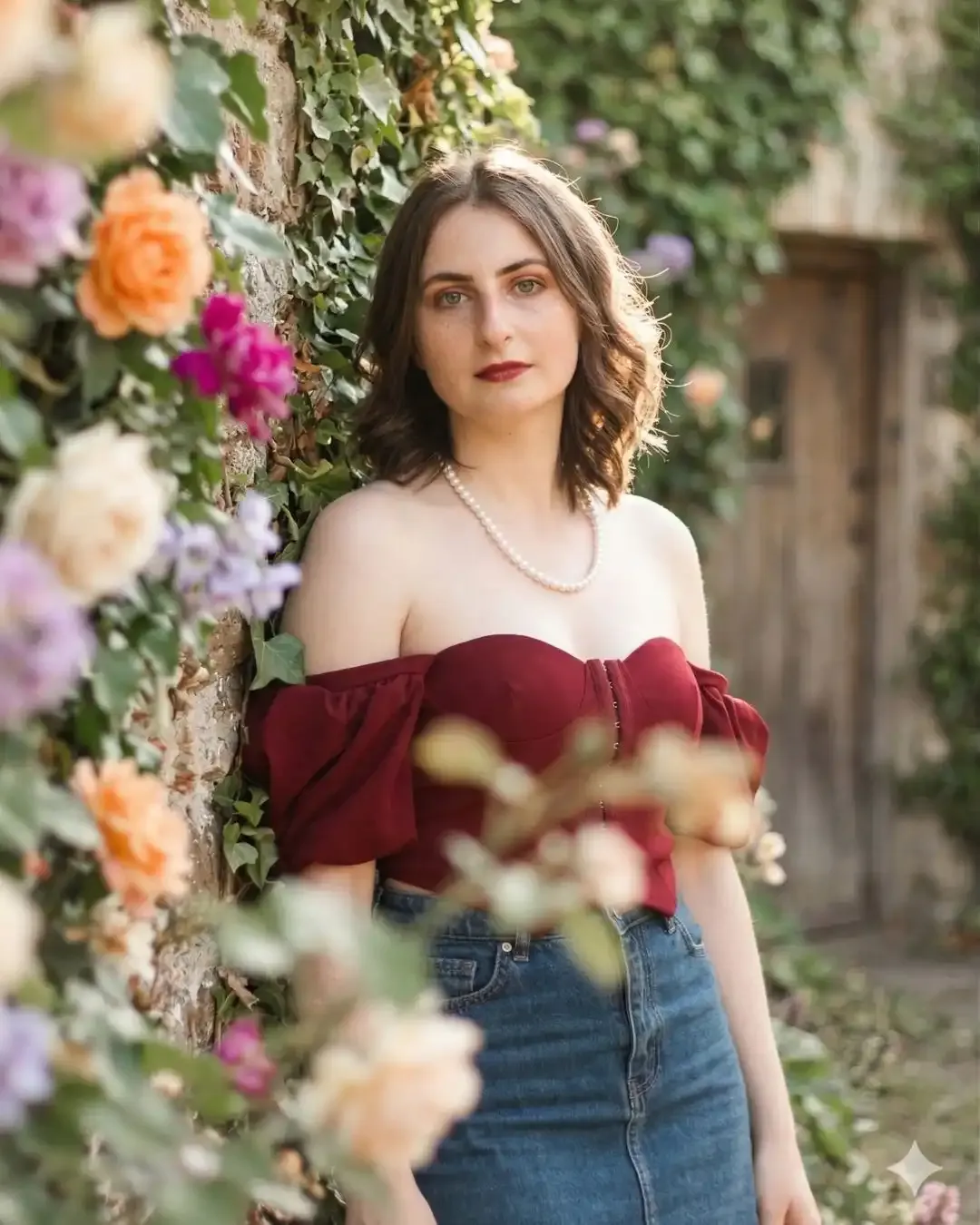
  • Countryside Setting: The background is transformed into an ivy-covered rustic stone wall of a countryside cottage.

  • Floral Elements: The scene is surrounded by lush green ivy and blooming flowers in specific orange, magenta, and lavender tones.

  • Dreamy Depth: Blurry flowers are added to the foreground to create a sophisticated, layered depth effect.

  • f/1.8 Lens Effect: A very shallow depth of field with creamy bokeh blur keeps the face perfectly sharp while the rest of the scene is beautifully blurred.

  • Golden Hour Lighting: Soft, warm sunlight falls naturally on the face, creating glowing highlights.

  • Vintage Aesthetic: Cinematic color grading with pastel tones, soft contrast, and a slightly warm, vintage film look.

How to Use This Prompt

Achieving this high-end Pinterest look with Gemini is easy. Follow these steps for the best photo edit results:

  1. Upload your reference photo to Google Gemini. A high-quality, well-lit source image yields the best results.

  2. Copy the prompt directly from PromptKing.

  3. Paste the text into the Gemini chat alongside your photo.

  4. Generate the image and wait for the AI to render your soft aesthetic transformation.

  5. Download and share your ultra-realistic, professional portrait.

Pro Tips for the Best Results

To ensure your final output looks exactly like a real DSLR photo and not an obvious AI generation, keep these tips in mind. First, provide a clear reference. While the AI preserves identity, a sharp input photo helps maintain natural skin texture in the 4K output. Second, verify framing. This prompt is designed for a half-body portrait from head to waist; ensure your input photo supports this composition. Finally, maximize contrast. If your input photo has harsh indoor lighting, Gemini will work hard to apply the golden hour glow, but using an outdoor source photo makes the soft floral blur and bokeh effect look even more natural.

Why You Need to Try This Style

The Soft Aesthetic Portrait edit is perfect for creators who want an authentic, relatable, yet high-quality look. Because the final result features natural skin texture and cinematic lighting, it does not look like a standard AI filter. This makes it ideal for updating your personal branding, creating engaging content for social media, or simply seeing yourself in a whole new, dreamy light.

About This Prompt

This is a professionally engineered AI prompt from the PromptKing library, designed for use with Gemini Pro such as ChatGPT, Midjourney, Google Gemini, and Claude. Copy this prompt instantly and use it to generate high-quality AI output. PromptKing offers 1000+ free and premium AI prompts across 50+ categories for creators, developers, and marketers.
Gemini Pro

Soft Aesthetic Portrait Gemini AI Prompt: Pinterest Style Photo Edit

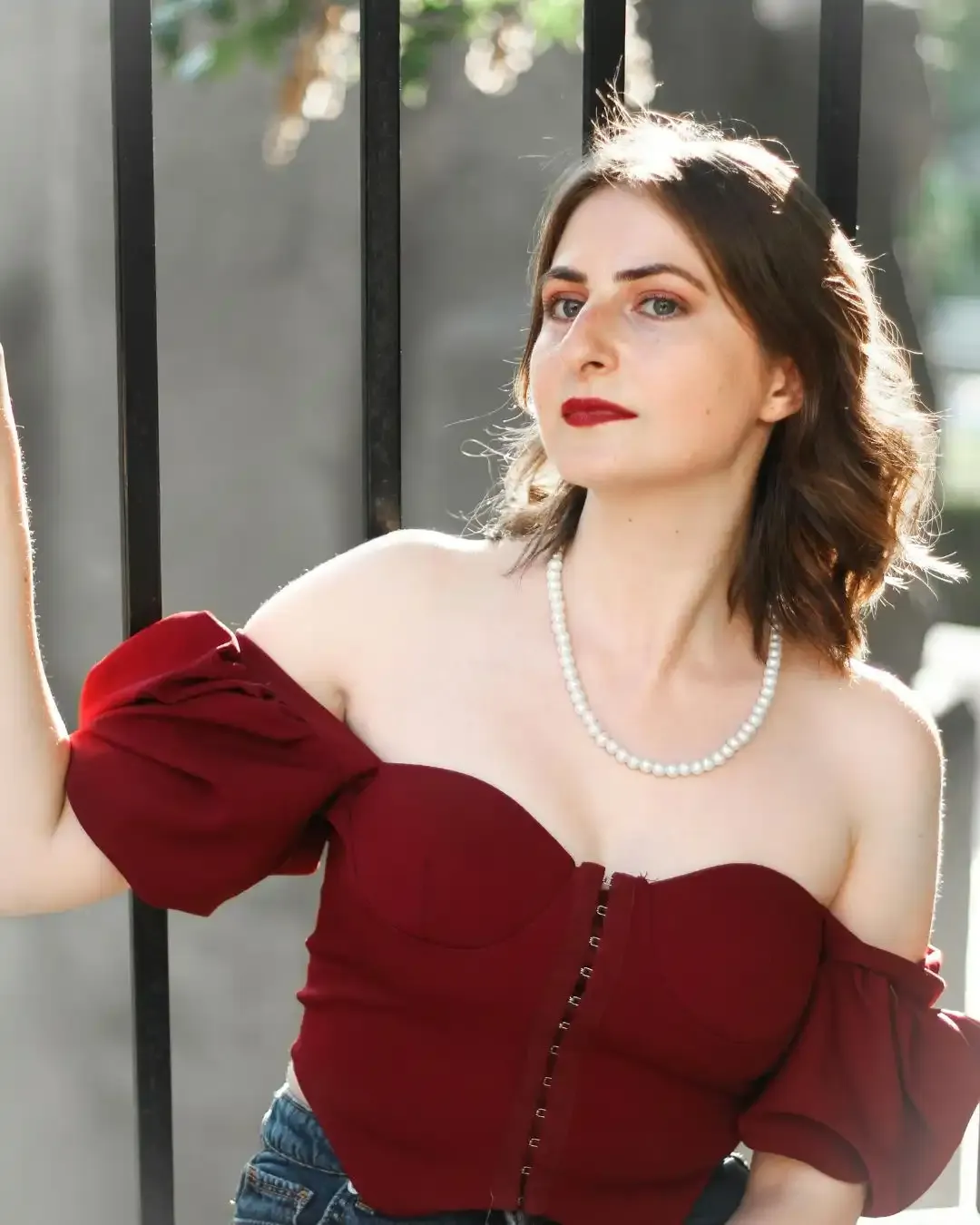
Soft Aesthetic Portrait Gemini AI Prompt: Pinterest Style Photo Edit - Gemini Pro Generated Prompt Result (After)Soft Aesthetic Portrait Gemini AI Prompt: Pinterest Style Photo Edit - Original Photo for AI Prompt (Before)
Security Vault Locked
Transform the uploaded image into a soft aesthetic portrait inspired by Pinterest-style photography. Keep the subject’s face, identity, skin tone, hairstyle, pose, and outfit 100% unchanged and realistic — no facial changes at all. Frame the subject in a half-body portrait (head to waist), standing or gently leaning against an ivy-covered rustic stone wall of a countryside cottage. Surround the scene with lush green ivy leaves and blooming flowers in orange, magenta, and lavender tones. Add soft blurry flowers in the foreground to create a dreamy layered depth effect. Apply a shallow depth of field with creamy bokeh blur (f/1.8 lens effect), keeping the face perfectly sharp and in focus while foreground and background remain beautifully blurred. Use warm golden hour lighting with soft sunlight falling naturally on the face, creating glowing highlights and gentle shadows. Add cinematic color grading with pastel tones, soft contrast, and a slightly warm vintage aesthetic. Ensure the final result looks like a real DSLR photo, ultra realistic, natural skin texture, 4K quality — not AI-generated. pinterest aesthetic, ivy wall photoshoot, golden hour glow, soft floral blur, dreamy bokeh, sony 50mm f1.8, ultra realistic, promptking style

Pro Tip

Use different AI tools like Midjourney or DALL-E to get varied, unique results.

Important Note

The final generated image may vary slightly based on the AI version and original photo.

About This

Do you want to achieve that perfectly curated, soft aesthetic look for your photos without spending hours in professional editing software? The Soft Aesthetic Portrait Gemini AI Prompt by PromptKing allows you to transform any uploaded image into a dreamy, Pinterest-style masterpiece while keeping the subject completely unchanged.

This unique prompt is specifically optimized for Google Gemini's image-to-image capabilities. It is designed for those who want to upgrade their background and lighting to a professional DSLR standard, featuring creamy bokeh and golden hour glow, without altering the subject’s face, identity, expression, or outfit. It offers a soft, natural alternative to intensely stylized and vibrant edits, such as our popular 3D Balloon Typography Fashion Portrait AI Prompt, focusing instead on organic realism and natural beauty.

What is This Prompt?

This ready-to-use Gemini AI prompt from PromptKing is a set of precise instructions engineered to take your uploaded reference photo and place it into a high-fashion, rustic countryside setting. It focuses heavily on shallow depth of field, cinematic color grading, and a vintage aesthetic. Unlike many AI editing tools that replace the face, this prompt enforces a strict identity lock, ensuring the person in the final high-quality 4K result is unmistakably you.

Key Features of the Soft Aesthetic Prompt

When you use this prompt in Gemini, the AI will prioritize the following elements to create an ultra-realistic DSLR photo effect:

  • Subject Preservation: The subject’s face, skin tone, hairstyle, pose, and outfit remain completely unchanged.

  • Countryside Setting: The background is transformed into an ivy-covered rustic stone wall of a countryside cottage.

  • Floral Elements: The scene is surrounded by lush green ivy and blooming flowers in specific orange, magenta, and lavender tones.

  • Dreamy Depth: Blurry flowers are added to the foreground to create a sophisticated, layered depth effect.

  • f/1.8 Lens Effect: A very shallow depth of field with creamy bokeh blur keeps the face perfectly sharp while the rest of the scene is beautifully blurred.

  • Golden Hour Lighting: Soft, warm sunlight falls naturally on the face, creating glowing highlights.

  • Vintage Aesthetic: Cinematic color grading with pastel tones, soft contrast, and a slightly warm, vintage film look.

How to Use This Prompt

Achieving this high-end Pinterest look with Gemini is easy. Follow these steps for the best photo edit results:

  1. Upload your reference photo to Google Gemini. A high-quality, well-lit source image yields the best results.

  2. Copy the prompt directly from PromptKing.

  3. Paste the text into the Gemini chat alongside your photo.

  4. Generate the image and wait for the AI to render your soft aesthetic transformation.

  5. Download and share your ultra-realistic, professional portrait.

Pro Tips for the Best Results

To ensure your final output looks exactly like a real DSLR photo and not an obvious AI generation, keep these tips in mind. First, provide a clear reference. While the AI preserves identity, a sharp input photo helps maintain natural skin texture in the 4K output. Second, verify framing. This prompt is designed for a half-body portrait from head to waist; ensure your input photo supports this composition. Finally, maximize contrast. If your input photo has harsh indoor lighting, Gemini will work hard to apply the golden hour glow, but using an outdoor source photo makes the soft floral blur and bokeh effect look even more natural.

Why You Need to Try This Style

The Soft Aesthetic Portrait edit is perfect for creators who want an authentic, relatable, yet high-quality look. Because the final result features natural skin texture and cinematic lighting, it does not look like a standard AI filter. This makes it ideal for updating your personal branding, creating engaging content for social media, or simply seeing yourself in a whole new, dreamy light.

How to Use this AI Prompt?

STEP 01

Copy Prompt

Click the copy button above to instantly capture the full, optimized prompt text to your clipboard.

STEP 02

Choose AI Tool

Open your favorite AI website like ChatGPT, Midjourney, or Bing. Trying different tools can give you even more amazing and professional results.

STEP 03

Paste & Customize

Paste the prompt into the tool. You can easily tweak any part of the text to match your exact creative vision.

STEP 04

Generate Magic

Press enter and watch as the AI generates stunning, high-quality results based on your custom prompt in seconds.

Darshan Patel
Prompt Creator

Darshan Patel

Full-stack web developer exploring the boundaries of AI. Dedicated to crafting and sharing high-value prompts for the modern digital creator.