Hanumanji Divine Aura AI Prompt | Cinematic Guardian Power Photo Edit by PromptKing

AI Tool: ChatGPT

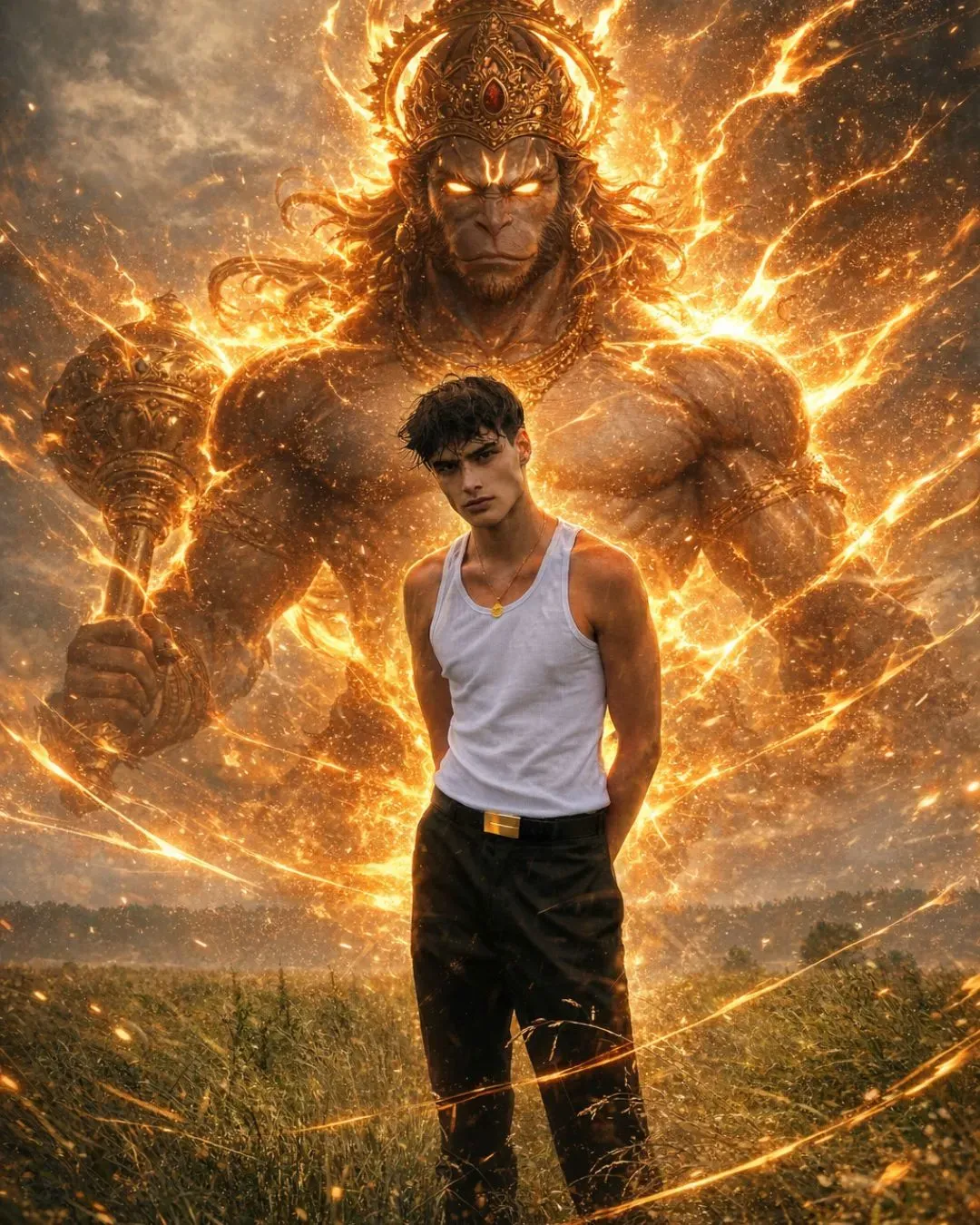
Are you looking to add a powerful, spiritual energy to your photos? The trending Hanumanji Divine Aura AI Prompt by PromptKing allows you to instantly transform any ordinary image into a cinematic masterpiece featuring a glowing guardian spirit standing right behind you.

Combining spiritual themes with cutting-edge AI editing, this ultra-realistic style is taking over social media and is perfect for creating viral content.

What is This Prompt?

This ready-to-use AI prompt from PromptKing is engineered to generate a breathtaking, high-quality edit with zero manual design skills required. By simply using text-to-image AI tools, this prompt generates:

  • A massive Lord Hanumanji aura manifesting behind your subject.

  • Glowing orange and golden divine energy that illuminates the scene.

  • Cinematic lighting and depth for a professional, studio-quality look.

  • A seamless ultra-realistic and anime-fusion visual style.

Explore More: You can discover and copy more powerful AI prompts directly from PromptKing.in.

Features of the Divine Hanumanji Edit

When you use this specific prompt, your AI generator will focus on adding intense, high-budget visual effects to your photo:

  • Divine Hanumanji Guardian Effect: A towering, protective presence in the background.

  • Aggressive Glowing Aura: Radiant energy waves surrounding the subject.

  • Glowing Divine Eyes: Intense, striking eye effects for the guardian spirit.

  • Lightning & Energy Waves: Dynamic elemental effects to bring the edit to life.

  • Cinematic Shadows: Perfectly balanced lighting to blend the aura with your original photo.

  • Unchanged Background: Keeps the focus on you while upgrading the atmosphere.

How to Use This Prompt (Step-by-Step)

Creating your own cinematic guardian edit is incredibly easy. Just follow these steps:

  1. Upload your photo to your preferred AI image generator or editing tool.

  2. Copy the prompt directly from PromptKing.

  3. Paste the text into your AI tool's prompt box.

  4. Generate the image and wait for the AI to apply the cinematic aura.

  5. Download & share your masterpiece!

Need an AI tool to get started? You can generate and explore powerful AI capabilities using tools like ChatGPT.

Pro Tips for the Best Results

To ensure your AI-generated image looks incredibly realistic and high-quality, keep these tips in mind:

  • Use a high-quality photo: Clear, well-lit subjects yield the best AI generations.

  • Keep the background natural: A simple background helps the AI blend the glowing aura seamlessly.

  • Try darker scenes: A nighttime or dimly lit original photo makes the orange and golden glow pop significantly more.

  • Adjust your brightness: Tweak the final image's contrast and brightness to maximize the aura effect.

Why is This Prompt Going Viral?

The Hanumanji Divine Aura edit is currently dominating social media algorithms. It perfectly blends a divine, powerful visual impact with an emotional, spiritual concept. Because it looks like a high-budget cinematic edit that took hours to create, it naturally drives high engagement, likes, and shares.

Best Use Cases:

  • Instagram Reels & Posts (Highly engaging visual hooks)

  • WhatsApp DP (Stand-out profile pictures)

  • Spiritual Edits & Fan Pages

  • YouTube Thumbnails (High click-through rates)

  • Personal Branding (For a powerful, protective aesthetic)

About This Prompt

This is a professionally engineered AI prompt from the PromptKing library, designed for use with ChatGPT such as ChatGPT, Midjourney, Google Gemini, and Claude. Copy this prompt instantly and use it to generate high-quality AI output. PromptKing offers 1000+ free and premium AI prompts across 50+ categories for creators, developers, and marketers.
ChatGPT

Hanumanji Divine Aura AI Prompt | Cinematic Guardian Power Photo Edit by PromptKing

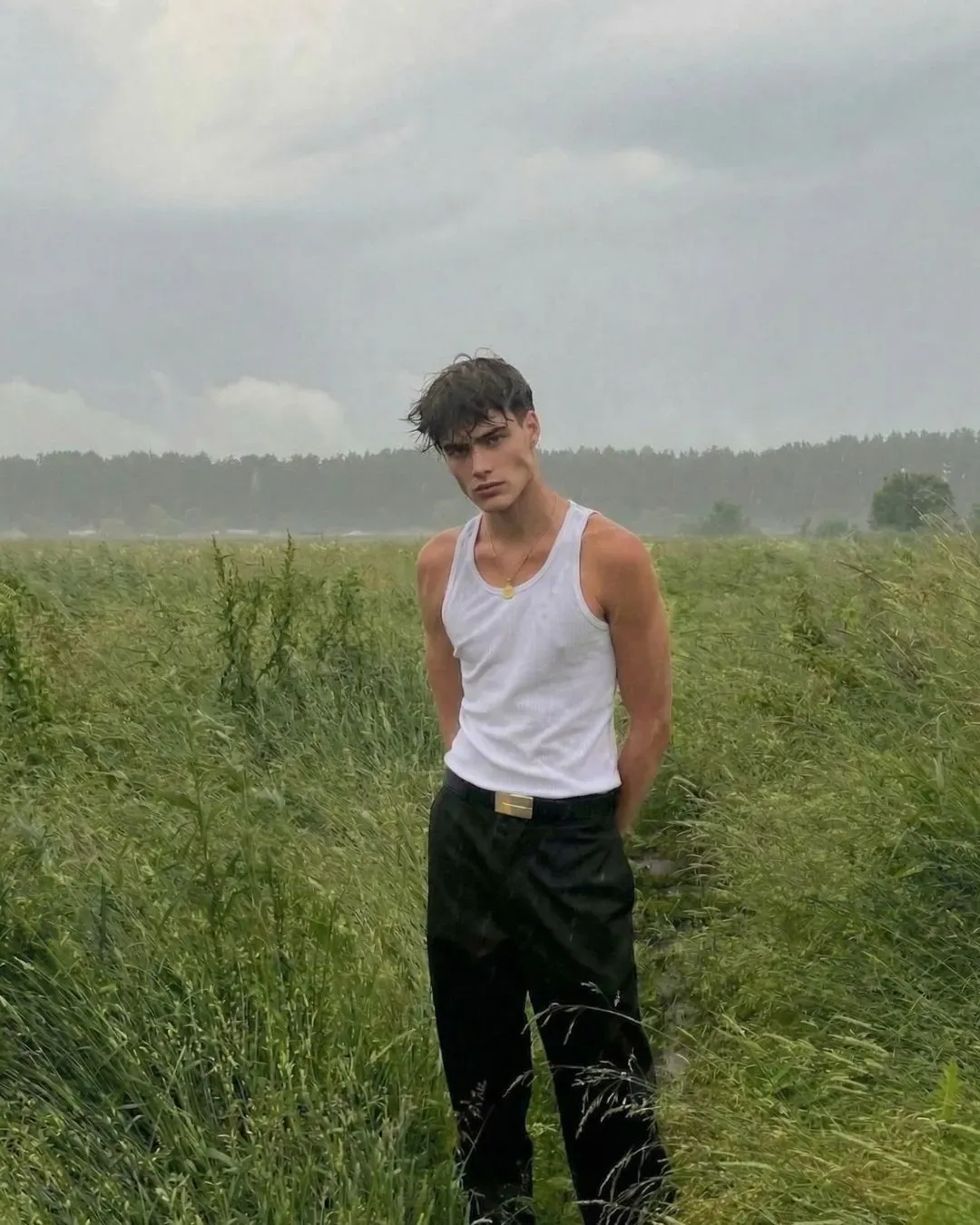
Hanumanji Divine Aura AI Prompt | Cinematic Guardian Power Photo Edit by PromptKing - ChatGPT Generated Prompt Result (After)Hanumanji Divine Aura AI Prompt | Cinematic Guardian Power Photo Edit by PromptKing - Original Photo for AI Prompt (Before)
Security Vault Locked
Transform the uploaded image into a cinematic divine power scene while keeping the original background EXACTLY unchanged (no replacement, no blur, no alteration). Keep the person’s face, identity, pose, body proportions, and outfit 100% unchanged and realistic. Add a massive divine Lord Hanuman positioned directly BEHIND and CENTERED with the person, perfectly aligned like a guardian presence. Show ONLY the upper half of Hanuman’s body (torso and head), emerging from behind the person like a powerful spirit. The lower body should fade into energy and not be visible. Hanuman should have a highly aggressive and powerful aura — intense expression, strong divine presence, slightly fierce but controlled (not scary, but dominant and protective). Do NOT make Hanuman a solid body — his entire form should be made of glowing orange/golden energy, semi-transparent, with the background visible through him. Define his structure using sharp glowing energy contours (muscular chest, face, arms, gada in partial energy form if visible). Add explosive aura energy bursting outward from his body — strong flame-like energy waves, sharp lightning streaks, and aggressive energy flares radiating in all directions. Add fast-moving glowing energy lines flowing around the person, like power is being released and protecting them. Include fiery embers, sparks, and intense glowing particles filling the scene for depth and motion. Give Hanuman bright glowing eyes (intense golden/white) that stand out through the aura. Add strong rim lighting around the person caused by Hanuman’s aura, with realistic warm light reflections on the ground and environment. Ensure strong depth: Hanuman appears huge, centered, and slightly behind, with his upper body dominating the frame like a divine force emerging. Apply cinematic lighting, high contrast, volumetric glow, motion energy effects, and ultra-realistic blending. Style: ultra-realistic + anime fusion, 4K, cinematic, aggressive divine aura, energy explosion, powerful guardian spirit, dramatic lighting

Pro Tip

Use different AI tools like Midjourney or DALL-E to get varied, unique results.

Important Note

The final generated image may vary slightly based on the AI version and original photo.

About This

Are you looking to add a powerful, spiritual energy to your photos? The trending Hanumanji Divine Aura AI Prompt by PromptKing allows you to instantly transform any ordinary image into a cinematic masterpiece featuring a glowing guardian spirit standing right behind you.

Combining spiritual themes with cutting-edge AI editing, this ultra-realistic style is taking over social media and is perfect for creating viral content.

What is This Prompt?

This ready-to-use AI prompt from PromptKing is engineered to generate a breathtaking, high-quality edit with zero manual design skills required. By simply using text-to-image AI tools, this prompt generates:

  • A massive Lord Hanumanji aura manifesting behind your subject.

  • Glowing orange and golden divine energy that illuminates the scene.

  • Cinematic lighting and depth for a professional, studio-quality look.

  • A seamless ultra-realistic and anime-fusion visual style.

Explore More: You can discover and copy more powerful AI prompts directly from PromptKing.in.

Features of the Divine Hanumanji Edit

When you use this specific prompt, your AI generator will focus on adding intense, high-budget visual effects to your photo:

  • Divine Hanumanji Guardian Effect: A towering, protective presence in the background.

  • Aggressive Glowing Aura: Radiant energy waves surrounding the subject.

  • Glowing Divine Eyes: Intense, striking eye effects for the guardian spirit.

  • Lightning & Energy Waves: Dynamic elemental effects to bring the edit to life.

  • Cinematic Shadows: Perfectly balanced lighting to blend the aura with your original photo.

  • Unchanged Background: Keeps the focus on you while upgrading the atmosphere.

How to Use This Prompt (Step-by-Step)

Creating your own cinematic guardian edit is incredibly easy. Just follow these steps:

  1. Upload your photo to your preferred AI image generator or editing tool.

  2. Copy the prompt directly from PromptKing.

  3. Paste the text into your AI tool's prompt box.

  4. Generate the image and wait for the AI to apply the cinematic aura.

  5. Download & share your masterpiece!

Need an AI tool to get started? You can generate and explore powerful AI capabilities using tools like ChatGPT.

Pro Tips for the Best Results

To ensure your AI-generated image looks incredibly realistic and high-quality, keep these tips in mind:

  • Use a high-quality photo: Clear, well-lit subjects yield the best AI generations.

  • Keep the background natural: A simple background helps the AI blend the glowing aura seamlessly.

  • Try darker scenes: A nighttime or dimly lit original photo makes the orange and golden glow pop significantly more.

  • Adjust your brightness: Tweak the final image's contrast and brightness to maximize the aura effect.

Why is This Prompt Going Viral?

The Hanumanji Divine Aura edit is currently dominating social media algorithms. It perfectly blends a divine, powerful visual impact with an emotional, spiritual concept. Because it looks like a high-budget cinematic edit that took hours to create, it naturally drives high engagement, likes, and shares.

Best Use Cases:

  • Instagram Reels & Posts (Highly engaging visual hooks)

  • WhatsApp DP (Stand-out profile pictures)

  • Spiritual Edits & Fan Pages

  • YouTube Thumbnails (High click-through rates)

  • Personal Branding (For a powerful, protective aesthetic)

How to Use this AI Prompt?

STEP 01

Copy Prompt

Click the copy button above to instantly capture the full, optimized prompt text to your clipboard.

STEP 02

Choose AI Tool

Open your favorite AI website like ChatGPT, Midjourney, or Bing. Trying different tools can give you even more amazing and professional results.

STEP 03

Paste & Customize

Paste the prompt into the tool. You can easily tweak any part of the text to match your exact creative vision.

STEP 04

Generate Magic

Press enter and watch as the AI generates stunning, high-quality results based on your custom prompt in seconds.

Darshan Patel
Prompt Creator

Darshan Patel

Full-stack web developer exploring the boundaries of AI. Dedicated to crafting and sharing high-value prompts for the modern digital creator.