couple photo editing prompt for gemini

AI Tool: Gemini Pro

Couple Photo Editing Prompt for Gemini

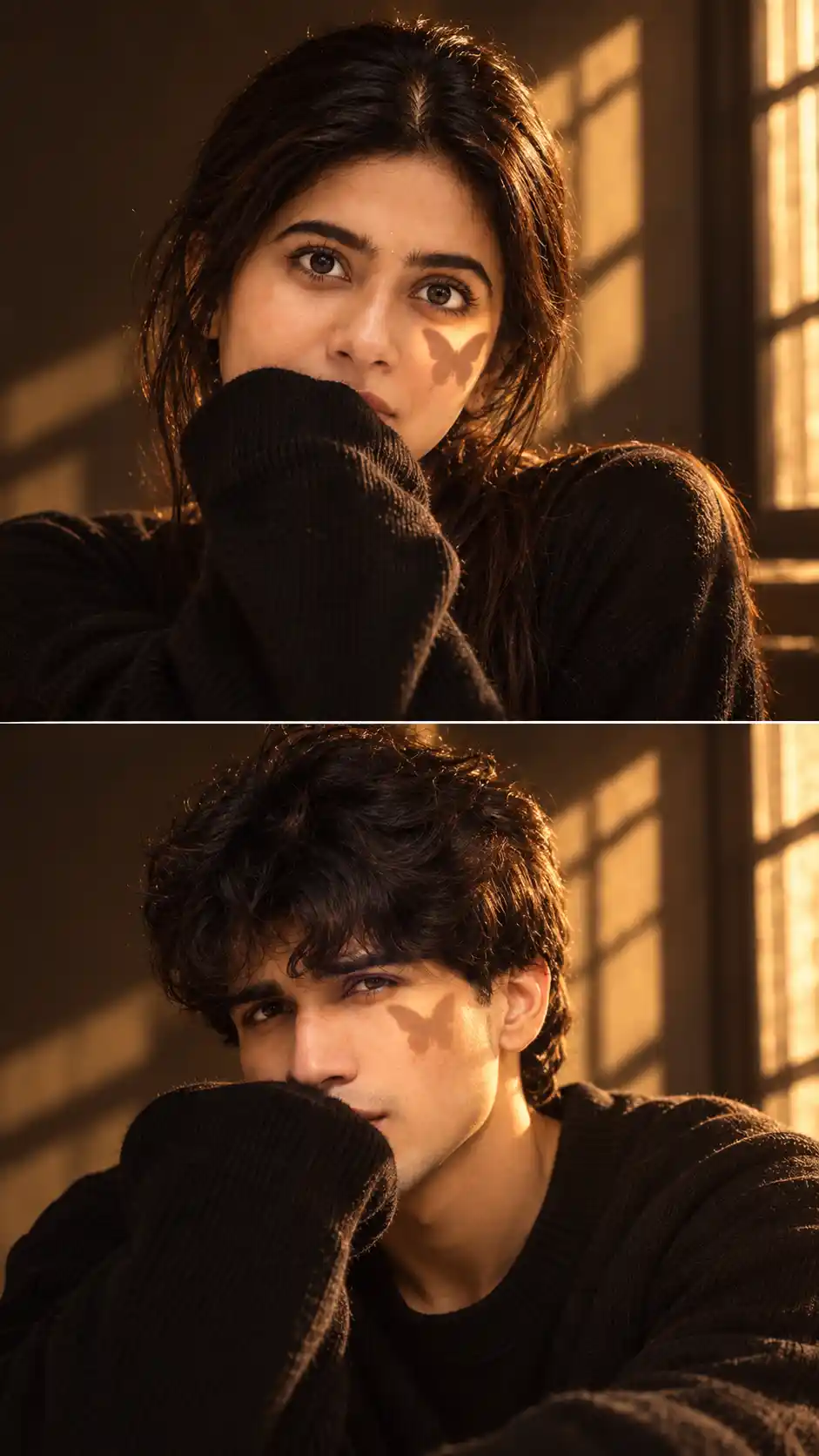
Transform a simple couple photo into a warm and cinematic editorial portrait using this couple photo editing prompt for Gemini. The prompt creates two separate close-up portraits of the same couple with dramatic golden-hour sunlight, dark clothing, soft window shadows, and an artistic butterfly-shaped light effect across the face.

This style is perfect for users who want something more creative than a standard couple portrait while keeping both people recognizable from the original reference image.

Cinematic Two-Panel Couple Portrait

The final image is designed as a vertical two-panel portrait composition. The woman appears in the upper frame and the man appears in the lower frame, creating a premium editorial collage look.

A thin horizontal divider separates both portraits while maintaining the same lighting, styling, background, and cinematic mood across the full composition.

Golden Hour Butterfly Shadow Effect

One of the main visual elements of this prompt is the warm butterfly shadow effect projected across each subject's cheek.

Strong golden sunlight enters through a nearby window and creates soft geometric shadows across the wall and face. The butterfly-shaped light detail gives the portrait a distinctive aesthetic look without making the image feel artificial.

Preserve Both Faces Naturally

This couple photo editing prompt for Gemini focuses strongly on facial consistency.

The prompt instructs Gemini to preserve:

  • Recognizable facial identity
  • Natural face shape
  • Eyes, nose and lips
  • Skin tone
  • Hairstyle characteristics
  • Natural facial proportions
  • Realistic skin texture

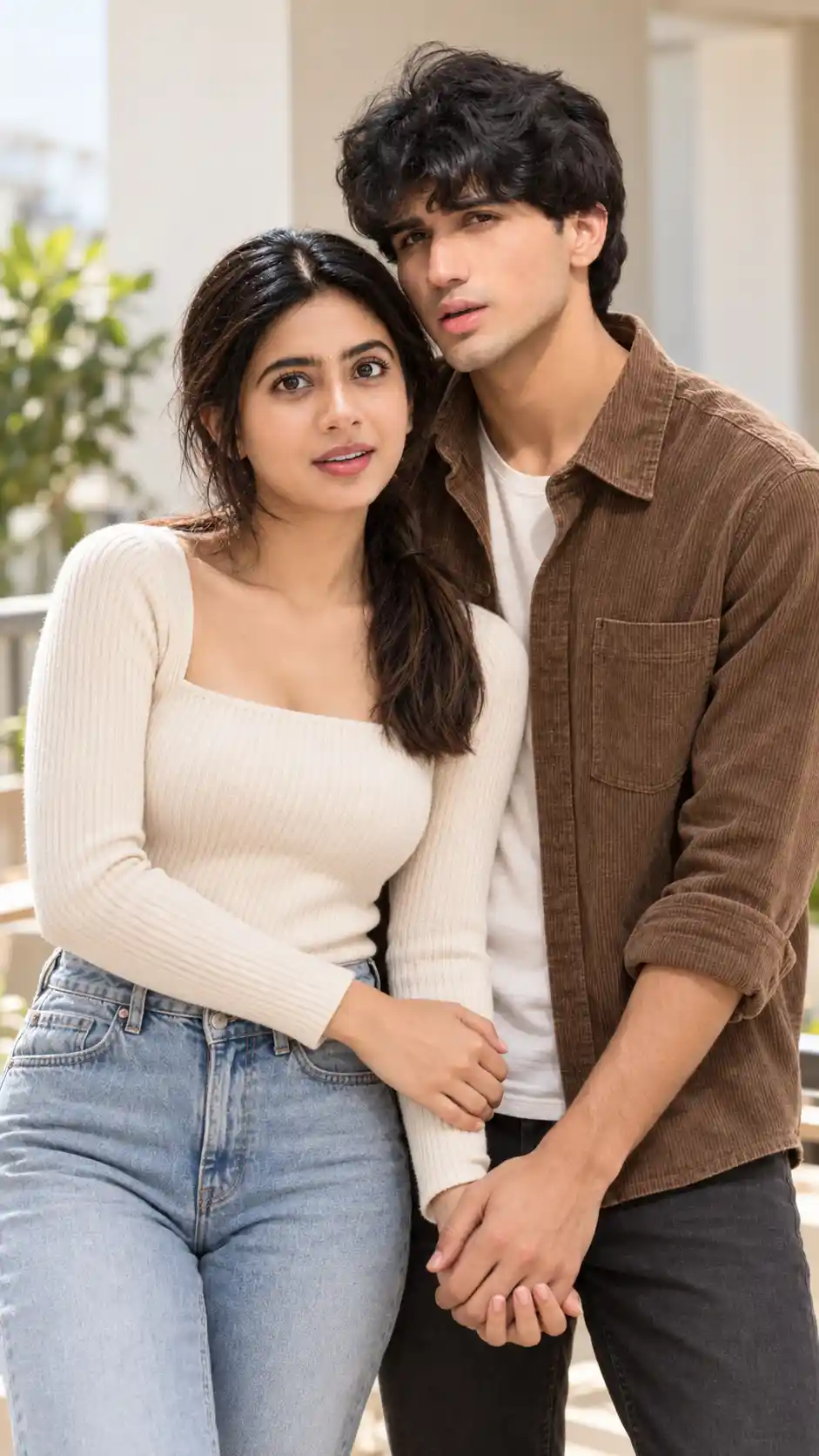
The final result should still clearly resemble the same man and woman from the uploaded reference photo.

Minimal Black Outfit Styling

Both subjects are styled in oversized black knit sweaters for a coordinated cinematic appearance.

The woman can raise one oversized sleeve naturally toward the lower part of her face, while the man uses a similar relaxed pose in his own panel. This creates visual consistency between the two portraits.

Warm Indoor Editorial Background

The scene uses a minimal dark brown interior with a window positioned to one side. Warm evening sunlight passes through the window and creates dramatic rectangular light patterns across the wall.

The result combines:

  • Warm amber lighting
  • Deep brown shadows
  • Golden sunlight
  • Dark black clothing
  • Soft cinematic contrast
  • Subtle film-style texture

Perfect for

  • Gemini couple photo editing
  • Cinematic couple portraits
  • Golden-hour photo transformations
  • Instagram aesthetic portraits
  • Two-panel photo collages
  • Romantic couple edits
  • Editorial AI photography
  • Butterfly shadow portraits
  • Social media profile content

Tips for Better Results

Upload a clear reference image where both faces are sharp and clearly visible. Good lighting and unobstructed facial details help Gemini preserve each identity more accurately.

For the strongest result, use a couple photo where both subjects have enough visible facial detail even if the original pose is different from the final composition.

Recommended Output Format

A 9:16 vertical aspect ratio works best for this two-panel design because it provides enough room for two stacked close-up portraits.

This format is especially suitable for Instagram Stories, Reels covers, Pinterest, and vertical social media posts.

Tags

  • couple photo editing prompt for gemini
  • cinematic couple prompt for gemini
  • golden hour couple photo prompt
  • butterfly shadow photo prompt
  • gemini couple photo editing
  • aesthetic couple ai prompt
  • cinematic portrait prompt
  • two panel couple portrait
  • romantic couple ai photo
  • golden hour portrait
  • couple photo transformation
  • aesthetic photo editing prompt

Frequently Asked Questions

What is a couple photo editing prompt for Gemini?
A couple photo editing prompt for Gemini is a detailed AI instruction that helps transform an existing couple photo into a new cinematic style while preserving the recognizable identities of both people.
Can Gemini create separate portraits from one couple photo?
Yes. A detailed prompt can instruct Gemini to use both people from one reference image and create separate coordinated portraits inside a two-panel composition.
What is the butterfly shadow effect?
The butterfly shadow effect uses shaped sunlight or shadow across the cheek to create a soft artistic detail commonly seen in cinematic and aesthetic portrait photography.
Will Gemini keep both original faces?
The prompt specifically instructs Gemini to preserve both recognizable facial identities, skin tones, face shapes, hairstyles, and natural features as closely as possible.
Which aspect ratio is best?
A 9:16 vertical aspect ratio is recommended because the design contains two vertically stacked close-up portraits and works well for Stories, Reels, and other vertical social media formats.

About This Prompt

This is a professionally engineered AI prompt from the PromptKing library, designed for use with Gemini Pro such as ChatGPT, Midjourney, Google Gemini, and Claude. Copy this prompt instantly and use it to generate high-quality AI output. PromptKing offers a hand-tested library of free and premium AI prompts for creators, developers, and marketers.
couple photo editing prompt for gemini

couple photo editing prompt for gemini - Gemini Pro Generated Prompt Result (After)couple photo editing prompt for gemini - Original Photo for AI Prompt (Before)
Prompt Locked
Create a **cinematic two-panel portrait** in **9:16 aspect ratio**, designed as **two vertically stacked close-up portraits** separated by a **thin horizontal divider**, with an **aesthetic editorial photo collage** look. The overall mood should feel **warm, intimate, dreamy, soft, and slightly mysterious**. Use a **golden-hour cinematic indoor portrait** style with a **warm amber, brown, black, and golden color grade**. Keep the final image **photorealistic** with **subtle film texture**. Set the scene in a **dark minimal indoor room** with a **warm dark brown wall**. Place a **window on the right side**, allowing **strong rectangular sunlight patterns** to fall across the wall and partly across the face. Use **low-key natural sunlight** with **dramatic window shadows**. In the **top panel**, show a **female subject** in a **tight close-up portrait**. She should have **dark brown long hair**, loosely pulled back, with a **center part and soft face-framing strands**. She is wearing a **black long-sleeve top**, with the **oversized sleeve raised across the lower part of her face**, partially hiding it. Her gaze should be **directly toward the camera**, with a **soft, calm, slightly mysterious expression**. In the **bottom panel**, show a **male subject** in a **tight close-up portrait**. He should have **dark brown short naturally tousled hair** with **soft textured strands**. He is also wearing a **black long-sleeve top**, with the **oversized sleeve covering the lower portion of his face**. His gaze should be **directly toward the camera**, with a **calm and serious expression**. Add a **small butterfly-shaped shadow** on the **right cheek and lower eye area** of each subject, as if the sunlight is passing through a **butterfly-shaped object or decoration**. The shadow should appear **sharp yet softly edged and natural**. Use **warm sunlight entering from the upper-right side**, with **soft but directional lighting**. Keep the light temperature **warm golden amber**, with **medium-high contrast**, **deep cinematic natural shadows**, and **gentle golden highlights across the eyes, forehead, and cheeks**. Frame both portraits in a **straight-on close-up angle**, with the subjects **centered**. Keep the **eyes and facial features in sharp focus**, with a **shallow depth of field** and a **softly darkened unobtrusive background**. Maintain a **minimal symmetrical portrait composition**. The image should look like it was taken with a **professional DSLR or mirrorless camera**, using an **85mm portrait lens** and a **wide aperture**. The photography style should be **cinematic editorial portrait photography**, with **ultra-realistic high resolution**. Use a color palette of **warm amber, golden brown, dark chocolate brown, black, and soft beige**. Apply **moderate-high contrast**, **slightly muted saturation**, **warm golden highlights**, **deep brown-black shadows**, and **subtle cinematic film grain**. Keep the **skin texture natural and realistic**, with **minimal realistic retouching** and a **soft vintage cinematic finish**.

Description

Couple Photo Editing Prompt for Gemini

Transform a simple couple photo into a warm and cinematic editorial portrait using this couple photo editing prompt for Gemini. The prompt creates two separate close-up portraits of the same couple with dramatic golden-hour sunlight, dark clothing, soft window shadows, and an artistic butterfly-shaped light effect across the face.

This style is perfect for users who want something more creative than a standard couple portrait while keeping both people recognizable from the original reference image.

Cinematic Two-Panel Couple Portrait

The final image is designed as a vertical two-panel portrait composition. The woman appears in the upper frame and the man appears in the lower frame, creating a premium editorial collage look.

A thin horizontal divider separates both portraits while maintaining the same lighting, styling, background, and cinematic mood across the full composition.

Golden Hour Butterfly Shadow Effect

One of the main visual elements of this prompt is the warm butterfly shadow effect projected across each subject's cheek.

Strong golden sunlight enters through a nearby window and creates soft geometric shadows across the wall and face. The butterfly-shaped light detail gives the portrait a distinctive aesthetic look without making the image feel artificial.

Preserve Both Faces Naturally

This couple photo editing prompt for Gemini focuses strongly on facial consistency.

The prompt instructs Gemini to preserve:

  • Recognizable facial identity
  • Natural face shape
  • Eyes, nose and lips
  • Skin tone
  • Hairstyle characteristics
  • Natural facial proportions
  • Realistic skin texture

The final result should still clearly resemble the same man and woman from the uploaded reference photo.

Minimal Black Outfit Styling

Both subjects are styled in oversized black knit sweaters for a coordinated cinematic appearance.

The woman can raise one oversized sleeve naturally toward the lower part of her face, while the man uses a similar relaxed pose in his own panel. This creates visual consistency between the two portraits.

Warm Indoor Editorial Background

The scene uses a minimal dark brown interior with a window positioned to one side. Warm evening sunlight passes through the window and creates dramatic rectangular light patterns across the wall.

The result combines:

  • Warm amber lighting
  • Deep brown shadows
  • Golden sunlight
  • Dark black clothing
  • Soft cinematic contrast
  • Subtle film-style texture

Perfect for

  • Gemini couple photo editing
  • Cinematic couple portraits
  • Golden-hour photo transformations
  • Instagram aesthetic portraits
  • Two-panel photo collages
  • Romantic couple edits
  • Editorial AI photography
  • Butterfly shadow portraits
  • Social media profile content

Tips for Better Results

Upload a clear reference image where both faces are sharp and clearly visible. Good lighting and unobstructed facial details help Gemini preserve each identity more accurately.

For the strongest result, use a couple photo where both subjects have enough visible facial detail even if the original pose is different from the final composition.

Recommended Output Format

A 9:16 vertical aspect ratio works best for this two-panel design because it provides enough room for two stacked close-up portraits.

This format is especially suitable for Instagram Stories, Reels covers, Pinterest, and vertical social media posts.

Frequently Asked Questions

What is a couple photo editing prompt for Gemini?

A couple photo editing prompt for Gemini is a detailed AI instruction that helps transform an existing couple photo into a new cinematic style while preserving the recognizable identities of both people.

Can Gemini create separate portraits from one couple photo?

Yes. A detailed prompt can instruct Gemini to use both people from one reference image and create separate coordinated portraits inside a two-panel composition.

What is the butterfly shadow effect?

The butterfly shadow effect uses shaped sunlight or shadow across the cheek to create a soft artistic detail commonly seen in cinematic and aesthetic portrait photography.

Will Gemini keep both original faces?

The prompt specifically instructs Gemini to preserve both recognizable facial identities, skin tones, face shapes, hairstyles, and natural features as closely as possible.

Which aspect ratio is best?

A 9:16 vertical aspect ratio is recommended because the design contains two vertically stacked close-up portraits and works well for Stories, Reels, and other vertical social media formats.