Bhagwat Geeta AI Photo Editing Prompt for ChatGPT & Gemini
AI Tool: Gemini Pro
Bhagwat Geeta AI Photo Editing Prompt: Unlock Divine Creativity with AI
The fusion of ancient spiritual wisdom and modern artificial intelligence has opened a powerful new path for digital artists, content creators, and AI photo editors. A Bhagwat Geeta AI Photo Editing Prompt helps creators visualize divine teachings, epic mythological characters, spiritual energy, and cinematic devotional scenes with realistic detail.
Whether you want to create content for Instagram, YouTube, Pinterest, educational platforms, merchandise, posters, or prompt-selling websites like PromptKing, this type of prompt can help you generate visually powerful and culturally meaningful AI images.
Creating high-quality AI art is not just about typing a simple idea into an AI tool. To get realistic faces, cinematic lighting, correct cultural outfits, readable text, and a divine atmosphere, you need a well-structured prompt. This blog explains how to use Bhagwat Geeta prompts properly with tools like ChatGPT, Gemini, Nano Banana, and other AI image generators.
What is a Bhagwat Geeta AI Photo Editing Prompt?
A Bhagwat Geeta AI Photo Editing Prompt is a detailed text instruction used in AI image generators to create spiritual, mythological, and divine-themed portraits inspired by the Bhagwat Geeta.
These prompts usually include details such as:
- Same face and identity preservation
- Traditional Indian royal-warrior outfit
- Divine golden lighting
- Kurukshetra battlefield background
- Open Bhagavad Gita book
- Lord Krishna-inspired aura
- Ancient chariot, horses, flags, and temple elements
- Cinematic spiritual atmosphere
The goal is to transform a normal photo into a premium devotional AI portrait while keeping the person’s identity natural and recognizable.
Why Bhagwat Geeta AI Prompts Are Trending
Spiritual and cultural AI photo editing is becoming popular because users want images that feel meaningful, emotional, and unique. Instead of simple beauty edits or fashion portraits, Bhagwat Geeta-inspired prompts create a powerful connection between devotion, mythology, and modern digital art.
These prompts are perfect for:
- Instagram reels covers
- YouTube thumbnails
- Spiritual profile pictures
- Festival posters
- Devotional blog images
- AI prompt websites
- Print-on-demand products
- Custom t-shirt graphics
- Educational mythology content
A well-written Bhagwat Geeta prompt can create images that look cinematic, premium, and emotionally strong.
Target Audience for This Prompt Collection
This Bhagwat Geeta AI prompt collection is useful for different types of creators.
| Target Audience | How They Can Use It |
|---|---|
| Digital Artists | Create divine portraits, mythological scenes, and cinematic artwork |
| Content Creators | Make viral Instagram, Pinterest, and YouTube visuals |
| E-commerce Owners | Design posters, apparel, and spiritual merchandise |
| Educators & Writers | Create visuals for articles, stories, and teachings |
| AI Enthusiasts | Learn prompt engineering with cultural and cinematic themes |
| Prompt Sellers | Add high-value spiritual prompts to AI prompt libraries |
How to Use Bhagwat Geeta AI Photo Editing Prompts
To get the best result, follow a simple workflow. The better your prompt structure, the better your final AI image will look.
Step 1: Choose the Right AI Tool
Select an advanced AI image generator. ChatGPT is useful for detailed prompt following and text rendering. Gemini and Nano Banana are good for creative photo editing and fast visual experiments. Midjourney is powerful for cinematic realism and artistic lighting.
Step 2: Upload Your Reference Image
If the prompt is made for photo editing, upload a clear face photo. The image should have good lighting and a visible face. This helps the AI preserve the same identity, hairstyle, skin tone, and expression style.
Step 3: Copy the Base Prompt
Use a detailed Bhagwat Geeta prompt that already includes identity preservation, outfit details, background, lighting, and mood.
Step 4: Customize the Details
You can change small parts of the prompt depending on your need. For example:
| Custom Element | Example |
| Outfit | Royal warrior outfit, simple spiritual outfit, saffron robe |
| Background | Kurukshetra battlefield, temple, golden sky, divine aura |
| Expression | Calm, powerful, fearless, devotional |
| Object | Open Bhagavad Gita book, bow, chariot, glowing scripture |
| Style | Ultra-realistic, cinematic, 8K, DSLR, divine lighting |
Step 5: Generate and Refine
After generating the image, check the face, hands, text, and background. If the result is not perfect, adjust the prompt with stronger instructions like “keep the same face,” “sharp focus on eyes,” “realistic hands,” or “perfectly readable text.”
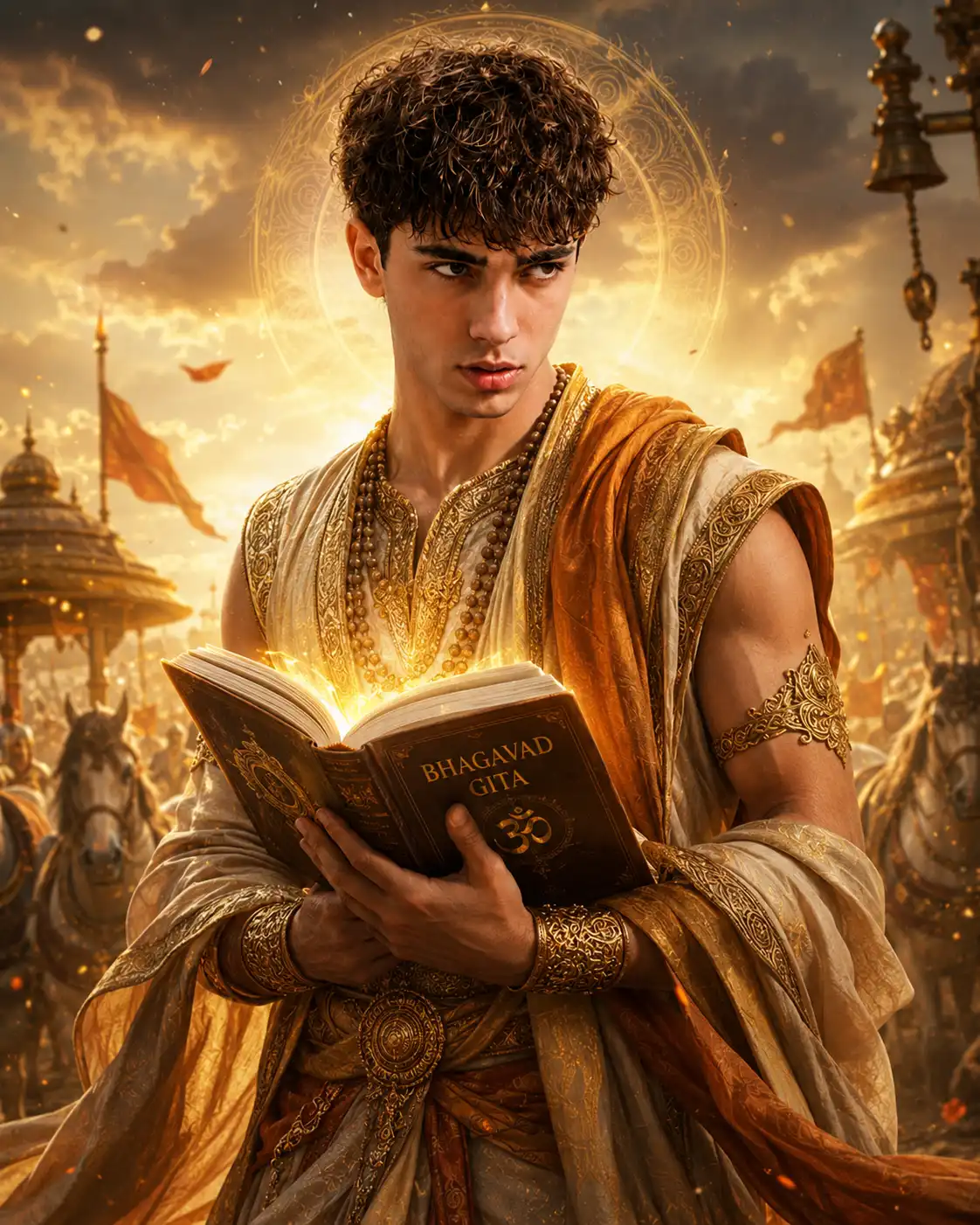
Featured Prompt Example 1: Divine Bhagavad Gita Portrait
This prompt is designed to create a cinematic spiritual portrait of a person holding the Bhagavad Gita in a divine battlefield atmosphere.
Copy-and-Paste Prompt
Use the uploaded image as the main identity reference. Preserve the same person’s recognizable face, facial features, skin tone, hairstyle, age, gender, body proportions, and natural identity as accurately as possible. Do not change the face shape, gender, age, or identity.
Create an ultra-realistic divine Bhagavad Gita inspired cinematic portrait of the same person standing in the sacred Kurukshetra battlefield at golden sunrise. The subject should look calm, powerful, fearless, and spiritually awakened, as if receiving divine wisdom and inner strength from the Bhagavad Gita.
Dress the person in an elegant ancient Indian royal-warrior spiritual outfit with cream, gold, saffron, and subtle bronze tones. Add detailed embroidered fabric, soft flowing shawl, sacred beads, royal arm accessories, and realistic cloth movement caused by gentle wind. The outfit should look premium, spiritual, royal, and cinematic, but not over-decorated.
The subject is holding an open Bhagavad Gita book close to the chest, with a peaceful focused expression. The face must be sharp, realistic, and highly similar to the uploaded photo. The eyes should look slightly upward with divine confidence or gently toward the glowing pages of the book.
Add warm golden sunlight, soft divine rays from the sky, floating dust particles, glowing Sanskrit-inspired light around the book, and a subtle spiritual aura behind the subject. In the background, show a majestic ancient chariot, soft silhouettes of horses, temple bells, saffron flags, and a peaceful battlefield atmosphere inspired by Lord Krishna’s guidance.
Use cinematic lighting, realistic skin texture, natural shadows, premium DSLR photography style, shallow depth of field, ultra-detailed fabric, divine glow, emotional storytelling, and 8K realistic quality. Avoid cartoon style, distorted face, extra fingers, unrealistic hands, changed identity, blurry eyes, over-smoothing, and low-quality output.
Prompt Anatomy Breakdown
| Element | Keywords Used | Purpose |
| Identity | Same face, same skin tone, same hairstyle | Keeps the uploaded person recognizable |
| Outfit | Ancient Indian royal-warrior spiritual outfit | Creates cultural and devotional styling |
| Background | Kurukshetra battlefield, chariot, horses, flags | Adds Bhagwat Geeta-inspired atmosphere |
| Object | Open Bhagavad Gita book | Makes the scripture the main focus |
| Lighting | Golden sunrise, divine rays, glowing pages | Creates a spiritual cinematic mood |
| Quality | Ultra-realistic, DSLR, 8K, sharp face | Improves final image realism |
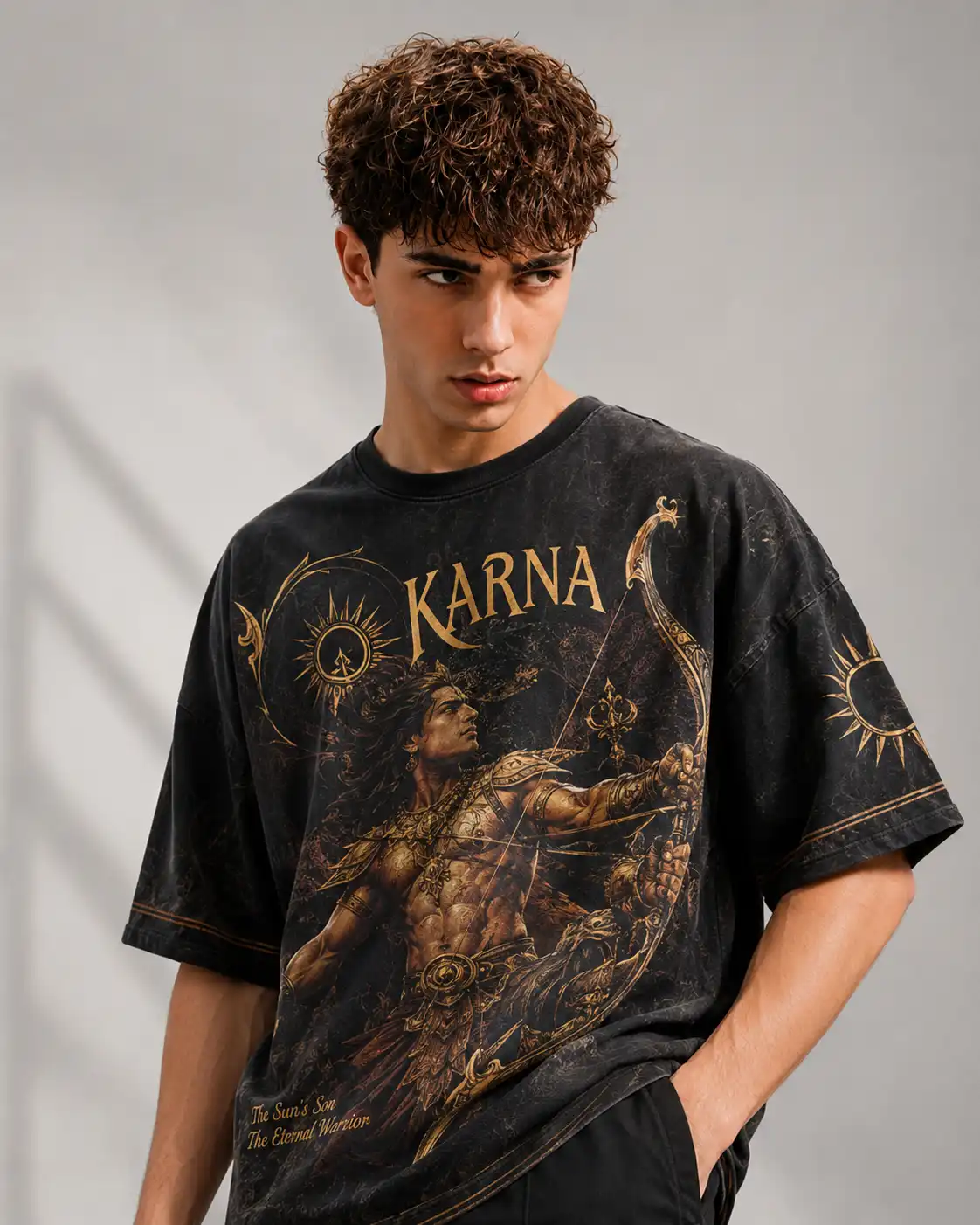
Featured Prompt Example 2: Modern Karna Streetwear T-Shirt Prompt
This prompt is useful for fashion creators, print-on-demand sellers, and e-commerce owners who want to combine Indian mythology with modern streetwear.
Copy-and-Paste Prompt
Create a professional fashion photography shot of a handsome young male model with short curly hair, posing in a well-lit modern studio with a clean light grey background. The model is wearing an oversized vintage-wash black t-shirt.
The t-shirt features a highly detailed golden-toned graphic design of the Hindu warrior Karna holding a bow, surrounded by sun motifs, divine rays, and mythological ornamental details. The word “KARNA” is prominently and perfectly spelled across the chest in an elegant mythological serif font.
Below the graphic, add smaller perfectly legible text that reads “The Sun’s Son” and “The Eternal Warrior.” The typography should look premium, sharp, centered, and suitable for a luxury streetwear brand.
Use sharp focus, realistic fabric texture, clean studio lighting, modern streetwear aesthetic, minimal background, no harsh shadows, natural model pose, realistic face, premium apparel photography, and 8K resolution. Avoid misspelled text, distorted letters, blurry print, unrealistic fabric, cartoon style, extra fingers, and low-quality details.
Prompt Anatomy Breakdown
| Element | Keywords Used | Purpose |
| Environment | Clean grey background, modern studio | Keeps focus on the t-shirt |
| Product | Oversized vintage-wash black t-shirt | Defines the apparel style |
| Graphic | Karna, bow, sun motifs, golden design | Adds mythological visual identity |
| Text | “KARNA”, “The Sun’s Son”, “The Eternal Warrior” | Helps AI create readable typography |
| Style | Streetwear, sharp focus, realistic fabric | Makes it suitable for product display |
Tips to Get Better Results with Bhagwat Geeta AI Prompts
1. Always Mention Identity Preservation
If you are using a reference image, always tell the AI to keep the same face, hairstyle, age, skin tone, and natural identity. This helps avoid random face changes.
2. Use Strong Lighting Keywords
Words like “golden sunrise,” “divine rays,” “cinematic lighting,” and “soft spiritual glow” help create a premium devotional mood.
3. Add Cultural Details Carefully
Use elements like royal-warrior outfit, saffron flags, chariot, sacred beads, temple bells, and glowing scripture. Do not overload the prompt with too many objects.
4. Keep Text in Quotation Marks
If you want readable text, always write it inside quotation marks. For example, use “BHAGAVAD GITA” or “KARNA”. Also add words like “perfectly spelled,” “crisp typography,” and “legible text.”
5. Add Negative Instructions
Negative instructions help prevent common AI mistakes. Include words like avoid distorted face, extra fingers, blurry eyes, changed identity, cartoon look, misspelled text, and unrealistic hands.
Common Mistakes to Avoid
| Mistake | Why It Hurts the Result |
| Writing a very short prompt | AI may create random or low-detail output |
| Not mentioning same face | The uploaded person’s identity may change |
| Adding too many background elements | Image can look messy and crowded |
| Forgetting negative prompt | Hands, face, and text may become distorted |
| Not using text in quotes | Words may appear misspelled or unreadable |
| Overusing glow effects | Image may look fake or over-edited |
Best Uses of Bhagwat Geeta AI Photo Editing Prompt
A Bhagwat Geeta AI prompt can be used for many creative and professional purposes.
| Use Case | Best Prompt Style |
| Instagram Portrait | Divine cinematic Bhagavad Gita portrait |
| YouTube Thumbnail | Powerful warrior pose with glowing scripture |
| Blog Featured Image | Clean spiritual portrait with readable book title |
| T-Shirt Design | Karna, Arjuna, Krishna, or warrior graphic |
| Poster Design | Kurukshetra battlefield with golden light |
| Educational Content | Mythological character illustration |
| Festival Creative | Spiritual outfit with temple and divine aura |
Final Thoughts
The Bhagwat Geeta AI Photo Editing Prompt is more than a simple AI image instruction. It is a creative bridge between ancient spiritual wisdom and modern digital art. With the right prompt structure, you can create cinematic portraits, devotional posters, mythological fashion graphics, and high-quality social media content.
For the best result, focus on clear identity preservation, cultural accuracy, cinematic lighting, readable text, and realistic details. Whether you are a digital artist, content creator, educator, e-commerce owner, or prompt seller, Bhagwat Geeta-inspired prompts can help you create powerful visuals that feel meaningful, premium, and visually unforgettable.
Tags
- ai prompts
- bhagwat geeta prompt
- chatgpt photo prompts
- nano banana prompts
- gemini ai prompts
- mythological ai photo
- krishna arjuna ai prompt
- kurukshetra ai art
Frequently Asked Questions
- Which AI generator is best for creating images with text like "Bhagavad Gita"?
- ChatGPT (using DALL-E 3) is currently the most reliable AI for generating legible, accurately spelled text on objects like books or t-shirts. Midjourney v6 is also highly capable but may require a few more rerolls to get the text perfect.
- How do I ensure my AI generated images have a clean, flat aesthetic?
- To achieve a minimal look, explicitly tell the AI what not to do. Use negative prompts or include phrases like "clean solid background," "no harsh shadows," "flat lighting," and "remove depth of field."
- Can I use these Bhagwat Geeta prompts for commercial purposes like print-on-demand?
- Yes. Images generated through paid tiers of tools like Midjourney, ChatGPT Plus, and Gemini Advanced generally grant you full commercial rights. Always verify the specific terms of service of the AI platform you choose.
- What is a "Nano Banana prompt"?
- Nano Banana refers to specific stylistic communities and generator workflows that focus on highly stylized, vibrant, and sometimes surreal digital art. Integrating Bhagwat Geeta themes with Nano Banana style prompts results in highly modern, eye-catching aesthetic art.
- Why does the AI sometimes generate the wrong cultural clothing?
- AI models rely on broad data. If you just say "Indian clothing," it might generate something generic. Be specific with your terms—use words like "embroidered Kurta," "golden armor," or "traditional dhoti" to guide the AI precisely.
About This Prompt
This is a professionally engineered AI prompt from the PromptKing library, designed for use with Gemini Pro such as ChatGPT, Midjourney, Google Gemini, and Claude. Copy this prompt instantly and use it to generate high-quality AI output. PromptKing offers a hand-tested library of free and premium AI prompts for creators, developers, and marketers.